
A WordPress development handover should give you the licences, records and access needed to run the site, along with a complete backup of its files and database. Confirm who owns each software licence and account, how credentials will be transferred securely, and whether you can access WordPress, hosting, the domain and connected services. Agree when the outgoing developer’s access will end, which checks must be completed first, who will handle transition issues and what support continues after the project closes.
Key Takeaways
- Clarify which licences belong to your business and which need to move from an agency account, so future updates and support are not disrupted.
- Transfer account access through individual invitations or secure credential sharing, and make ownership of key accounts clear.
- Agree when the handover is complete, who handles issues during the transition and what support continues afterwards.
- Arrange a complete, recoverable backup before changing access or services, and make sure the incoming team can use it.
Checking plugin, theme, font and image licences
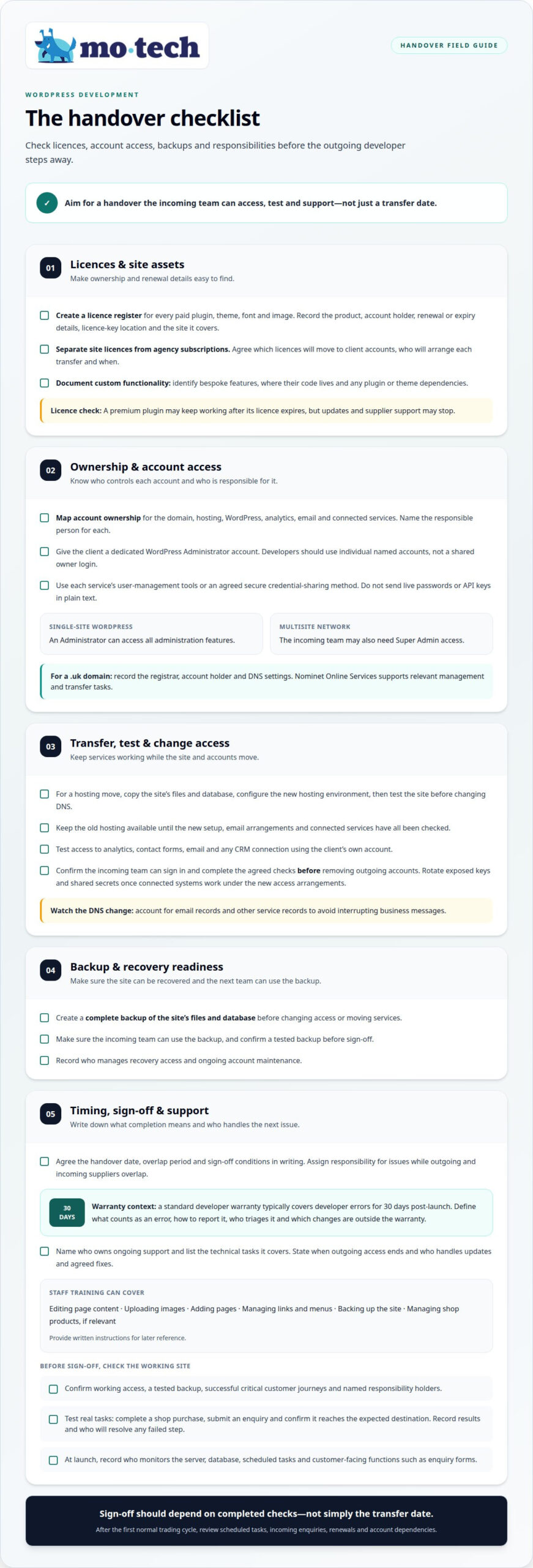
Begin the WordPress development handover with a licence register covering every paid plugin, theme, font and image. Record each product, its account holder, renewal or expiry details, where its licence key is stored and which site it covers. This makes it easier to distinguish assets your business owns from those supplied through an agency account.
Separate site-specific licences from agency-wide subscriptions. An agency-wide licence for a paid tool may not transfer when the developer relationship ends. Agree which licences will move to client accounts, who will arrange each transfer and when. A premium plugin may continue working after its licence expires, but updates and supplier support may stop.
- Plugins: List each paid plugin, its account holder and licence key location, so the next team can manage renewals and updates.
- Theme: Record the theme name, provider and theme licence key, so future maintenance has the relevant details.
- Fonts and images: Document each asset’s source and available licence information, so the next team knows which files and terms relate to the site.
- Custom functionality: Identify bespoke features and where their code lives, so developers can distinguish them from theme settings and paid plugins.
Keep the checklist with the handover documents, rather than only in a developer’s inbox. Include setup notes for custom code and identify dependencies on particular plugins or themes. Custom functionality built into a maintainable plugin, separate from the theme, can remain in place through a redesign.
A missing licence does not automatically mean the website must be rebuilt. The incoming team can assess whether a replacement is needed, what the change involves and how it affects future updates. That assessment is easier when the records name the affected plugin or theme and explain what depends on it. Clear documentation gives the client and incoming developer a practical basis for planning next steps.
How Do You Securely Transfer Credentials and Access Rights?
Map ownership before changing accounts. Record who controls the domain, hosting, WordPress, analytics, email and connected services, and name the person responsible for each. Give the client a dedicated WordPress Administrator account. Developers should use individual named accounts, not a shared owner login.
To migrate a WordPress site to a client’s hosting account, copy its files and database, configure the new hosting environment, then test the site before changing DNS. Keep the old hosting available until the new setup, email arrangements and connected services have all been checked.
For a .uk domain, the registrant can use Nominet Online Services for relevant management and transfer tasks. Record the registrar, account holder and DNS settings, including records used by email and other services. Changing DNS without accounting for email can interrupt business messages.
- Transfer access: Use each service’s user-management tools or an agreed secure credential-sharing method, rather than sending live passwords or API keys in plain text.
- Check WordPress roles: A standard single-site Administrator can access all administration features; a multisite network may also need Super Admin access.
- Confirm connected accounts: Test analytics, contact forms, email and any CRM connection using the client’s own access.
- Record responsibilities: Note who manages renewals, DNS changes, recovery access and ongoing account maintenance.
Common handover mistakes include relying on an Editor account, leaving the domain or hosting in a developer’s name, and removing access before the incoming manager has tested it. These gaps can block recovery or interrupt services. Confirm the new team can sign in and complete the agreed checks before removing outgoing accounts. Rotate exposed keys and shared secrets once connected systems are working under the new access arrangements. Then downgrade or remove developer accounts that are no longer needed, while preserving any agreed temporary access.
Agreeing handover timing and support responsibilities
Set the handover date, overlap period and sign-off conditions in writing. A standard developer warranty typically covers developer errors for 30 days post-launch. Define what counts as an error, how to report it, who triages it and which changes fall outside that warranty. Ongoing support is separate: name its owner and list the technical tasks it covers.
Training should cover the WordPress tasks your team will handle. Show staff how to edit page content, upload images, add pages, manage links and menus, and back up the site. For a shop, explain how to manage products. Provide written instructions so staff can refer to them after the session.
- Before sign-off: Confirm working access, a tested backup, successful critical customer journeys and named responsibility holders.
- At launch: Record who monitors the server, database, scheduled tasks and customer-facing functions, such as enquiry forms.
- During overlap: Assign who handles each issue while outgoing and incoming suppliers both have responsibilities.
- After acceptance: State when outgoing access ends and who owns technical support, updates and any agreed fixes.
Test the site in ways that reflect its actual use. For example, complete a purchase through the shop, submit an enquiry and confirm it reaches the expected destination. Record the result and who is responsible for resolving any failed step. Sign-off should depend on completed checks, not simply the transfer date.
Plan a review after the first normal trading cycle. Check that scheduled tasks ran, enquiries arrived, renewals remain in place and account dependencies still work. Automated uptime monitoring can report whether a site responds, but it is not the same as staffed support that investigates and fixes issues. Document which service is in place, who receives alerts and who acts on them.
Planning the handover and creating a recoverable backup
Before changing access or moving services, create a complete backup of the WordPress site’s files and database. A WordPress content export is an XML file, not a restorable copy of the entire installation. Record where the full backup is stored and who can retrieve it. Keep it secure because backup files may contain customer information and configuration secrets.
Plan the transfer in a clear sequence. Lower DNS time to live (TTL) before migration, freeze production changes, then create and test a fresh backup. Prepare a staging environment and push a small, harmless change through the deployment process. This confirms the workflow before the incoming team deploys meaningful code.
- Confirm what is backed up: Include both website files and the database, since either alone may be insufficient for recovery.
- Test restoration: Restore the copy in a safe environment and confirm the site opens and key functions work.
- Record ownership: Note who controls the backup location, who can restore it and who accepts responsibility after transfer.
- Protect live activity: For shops, bookings or memberships, account for new orders and customer changes during the move.
A backup is useful only if it can be restored without losing important activity. Restoring an older database for a busy shop can remove orders placed after that copy was made. Agree how current transactions and customer records will be preserved, and test the relevant customer journey before accepting the transfer.
Keep old hosting active until responsible people have confirmed the agreed checks, email arrangements, data transfer and backup access. This avoids cutting off a recovery route or disrupting business email before the new setup is ready. Record the final backup date, storage location, restoration test result and person approving the handover. Plan a controlled WordPress handover with these recovery steps in view.
Mo•tech: White-label WordPress support
mo•tech provides White-label WordPress support for agencies that need technical help after a project handover. Your agency can keep client relationships and communication under its own brand while the technical work is handled behind the scenes.
Use this support when your team needs help maintaining WordPress sites or managing ongoing technical work without taking every task on in-house. If a handover also reveals build requirements, mo•tech provides Custom Builds. Managed Security is available for website security needs.
The right next step depends on which work your agency needs covered and how it fits your client commitments. Contact mo•tech to discuss WordPress support tailored to your agency’s needs.
Make the next transition easier to manage
A WordPress development handover can establish a useful baseline for future changes, not just mark the end of a build. Treat agreed records and responsibilities as working documents. Update them when your team, suppliers or site setup changes, so decisions stay clear and client work can continue without avoidable uncertainty.
For an agency, continuity also helps protect the experience clients expect from your team. mo•tech provides technical expertise for agency WordPress work, with support shaped around each relationship’s requirements. Your agency retains control of client communication while arranging technical help behind the scenes.
Discuss your next handover with mo•tech and take a considered next step for your agency.
Frequently Asked Questions
What Should a Developer Hand Over When a WordPress Project Is Finished?
Alongside site access and operating records, request the materials a future developer needs to understand and modify the build. These may include source code, the Git repository’s commit history, deployment scripts, a system blueprint covering PHP and database setup, and original design files such as logos and graphics. Document third-party integrations too, so connected services can be maintained without relying on undocumented assumptions.
How can I tell whether the handover is complete?
A handover is complete when the agreed records and tests give the next responsible person a usable picture of the site. Check, for example, that cross-browser results and accessibility reports are documented, and that performance measures have a recorded baseline. For a WooCommerce site, retain checkout and payment test logs. These records help distinguish a new fault from a condition that existed at transfer.
How often should WordPress maintenance happen after handover?
Plan to review available WordPress and plugin updates at least every three months, and do not leave checks more than six months apart. Maintenance should account for the site’s dependencies: an update can affect a theme, plugin or PHP compatibility. For a store or membership site, schedule suitable testing around updates to confirm essential customer actions still work after changes are applied.
Is a WordPress administrator login enough for a handover?
No. An Administrator login does not explain the site’s technical configuration. WordPress’s Site Health Info screen can export details such as the WordPress version, installed plugins and themes, server setup, database information and filesystem permissions. Keep the export with the handover records so a new developer can understand the environment before changing code or investigating a problem.
What are the source codes?
Source code is the set of files and instructions developers use to build and change a website. In WordPress, it may include theme files, custom plugins and deployment scripts, alongside the database that stores site content and settings. A complete handover should make the code available to the business or its authorised team, rather than leaving it only in a developer’s private workspace.
What does a handover of a website mean?
A website handover transfers the context needed to keep the site aligned with its purpose. Alongside technical records, document the original business goals and the reasoning behind important design and functionality decisions. This helps a future team understand why the site works as it does, instead of treating existing choices as unexplained requirements or changing them without context.