
Outsourcing WordPress maintenance makes sense when keeping updates, backups and security checks in-house takes time away from client work. Basic DIY maintenance can take an estimated 4-8 hours per month when nothing goes wrong, so the decision is whether that time and responsibility are better handled internally or by a trusted partner. Knowing how to outsource WordPress maintenance means setting clear boundaries, not handing over accountability.
It’s reasonable to want dependable technical support without weakening your client relationships. Outsourcing can help, but only when the work, response expectations and approval process are clear. Your agency remains responsible for the commitments it makes to clients.
This guide explains how to compare in-house work with outsourcing, assess security and support, plan a budget around a defined scope, and keep clients informed. It also explains how white-label support lets technical delivery happen behind your agency while you retain the client relationship.
Key Takeaways
- Choose between automated updates and managed maintenance by weighing the oversight, testing and repair work your team can reliably handle.
- Assess security support by the safeguards it covers, including vulnerability checks, malware scanning and a clear response process.
- Set a budget around your site’s complexity and define what routine maintenance includes, so development work and urgent fixes have clear boundaries.
- Keep client accountability with your agency: agree who approves changes, how work is reported and how a white-label partner supports your relationship.
1. Should You Outsource Your WordPress Maintenance?
Basic DIY WordPress maintenance takes an estimated 4-8 hours per month when nothing goes wrong. Automated updates can install WordPress core, theme and plugin releases, but they don’t test whether forms, checkout or page layouts still work afterwards. Managed maintenance adds oversight: updates can be reviewed, tested and followed by checks on the live website.
A maintenance agency can provide a team and a defined service scope. A freelancer may offer direct technical support, with delivery shaped by their availability and expertise. Managed hosting focuses on the server and hosting environment; it does not necessarily include WordPress updates, backups or hands-on repairs. To decide how to outsource WordPress maintenance, first identify which responsibilities your team can reliably handle in-house.
Outsourced maintenance may cover core, theme and plugin updates, monitored backups, security checks, performance reviews and technical support. The precise scope matters. For example, an online shop may need updates tested against checkout and payment functions, while a brochure site may need its forms checked. Set backup frequency according to how often the site changes, and account for the needs of complex sites.
For UK GDPR planning, treat provider access to personal data as a controlled arrangement. Define the purpose of access, permitted activity, security expectations, incident escalation and what happens to data when the arrangement ends. Keep oversight of your agency’s client commitments and document who is responsible for each part of the work.
Give each person an individual account with only the permissions they need. Use controlled credentials and never send passwords by email. Before handover, agree who manages hosting, domains, backups and approvals. Give the provider an up-to-date site inventory, access details through a secure method, known issues and the update schedule. Test a backup and confirm the site works after the handover.
The practical question of how to outsource WordPress maintenance is whether your team can consistently review updates, verify backups and handle faults. WordPress releases major updates 2-3 times per year, while security patches arrive more frequently. A clear schedule assigns responsibility for updates and post-release checks, rather than relying on automation alone.
2. Security monitoring and malware prevention
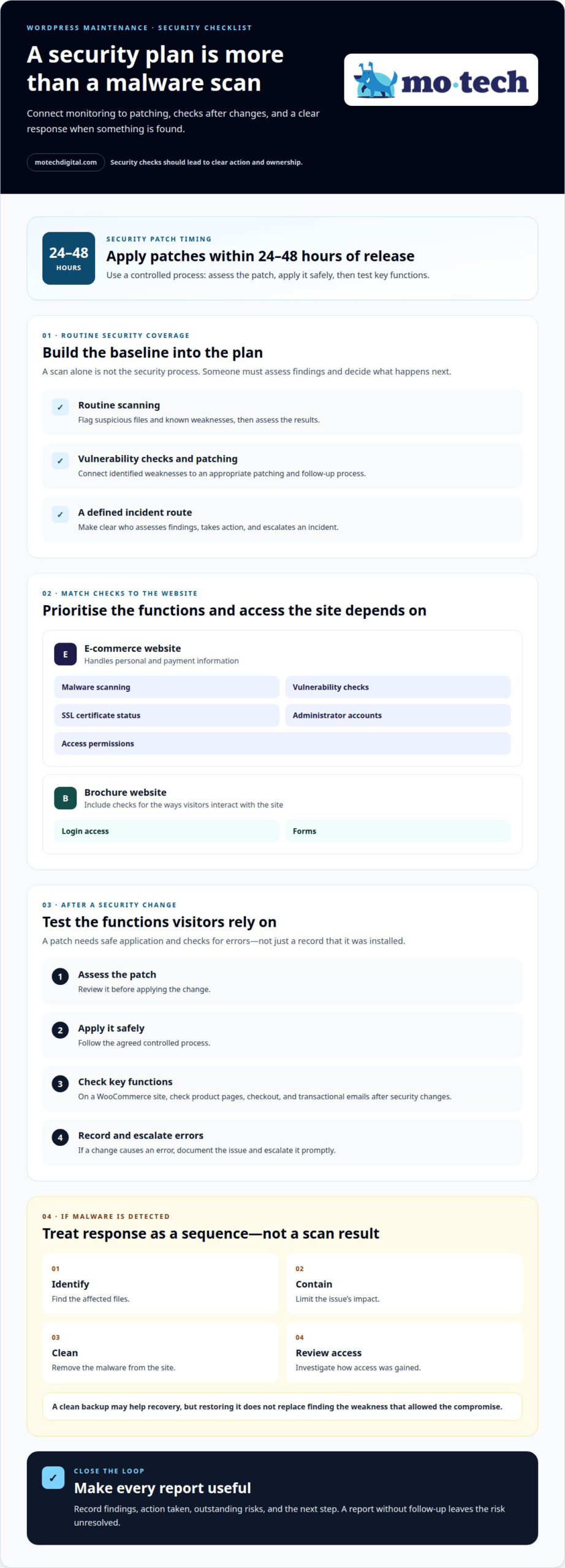
A security plan needs more than a malware scan. For a WordPress website, it should combine routine scanning, vulnerability checks, patching and a defined response process. Scans can flag suspicious files or known weaknesses, but someone must assess the findings and decide what action to take. A report without follow-up leaves the risk unresolved.
Match checks to what the site handles. An e-commerce website processing personal and payment information should prioritise malware scanning and vulnerability checks. Include reviews of SSL certificate status, administrator accounts and access permissions. For a brochure site, check login access and forms too. These steps can reveal weaknesses before they affect visitors, enquiries or revenue.
Timing matters. Security patches should be applied within 24-48 hours of release, according to the recommended maintenance guidance in this market research. That window still needs a controlled process: assess the patch, apply it safely, then test key functions. On a WooCommerce site, check product pages, checkout and transactional emails after security changes. If a change causes an error, record the issue and escalate it promptly.
Ask what monitoring actually covers. A useful routine connects scan results with updates, access reviews and a clear incident route. If malware is detected, the response should identify affected files, contain the issue, clean the site and review how access was gained. Restoring a clean backup may help recovery, but it does not replace finding the weakness that allowed the compromise.
Security and performance optimisation should also be considered together. A compromised site can disrupt normal use, while unnecessary changes can introduce new faults. Keep monitoring reports specific: list findings, action taken, outstanding risks and the next step. For agencies that need a structured approach to ongoing WordPress protection, managed website security can support these maintenance tasks without obscuring what happened or who owns the response.
3. Support scope, budgets and response expectations
Define the monthly scope before setting a budget. Specify whether it includes routine plugin updates, backup checks, uptime monitoring and minor fixes. Separate these tasks from redesigns, new e-commerce functions and substantial content changes. A WooCommerce checkout change, for example, needs separate approval and an estimate. Clear boundaries help distinguish ongoing maintenance from additional project work.
In the UK, assess a provider’s WordPress experience, support process, reviews and fit with your agency’s needs. Ask for a written scope, business-hours coverage and a clear escalation route. UK-based support can simplify handovers across shared working hours. Review how completed checks and follow-up work are recorded. A consistent, documented process matters more than broad claims about reputation.
Set a recurring maintenance schedule, then agree how support requests fit around it. A weekly maintenance cycle gives routine checks a defined place. Use a monthly report to record completed work, open issues and planned tasks. Proper WordPress maintenance takes 3-5 hours per site per month as a planning reference. A complex website may need a different allocation.
Agree response expectations during onboarding. A site outage, compromised website or broken checkout is urgent; a layout adjustment is not. Define who receives urgent reports, who can approve chargeable work and how critical incidents are escalated. State whether support operates during business hours or offers wider coverage. Match the agreed level to your clients’ needs.
Outsourcing risks include unclear ownership, delayed decisions and changes made without approval. Reduce them with written responsibilities, controlled account access, a named escalation route and regular work summaries. Choose a UK provider whose technical experience, support arrangements and reviews match your requirements. Outsourcing is a poor fit if your agency needs immediate control over every task or continuous cover the agreement doesn’t provide.
4. White-label outsourcing and client accountability
White-label delivery lets an agency delegate technical work while remaining the client’s main contact. It does not transfer responsibility for the service your agency sells. You still need a clear view of completed work, outstanding risks and decisions requiring approval.
Set the relationship in writing before a partner handles a WordPress core update or investigates vulnerabilities. Agree confidentiality expectations, access boundaries and how the partner will protect your agency’s client relationship. An NDA can support that arrangement. Define who may speak to the client, hosting company or other suppliers, and when the agency must approve contact.
Next, assign decision rights for common tasks. The partner might carry out routine maintenance, while your agency approves chargeable work and significant changes. Installing a routine patch, for example, differs from changing an e-commerce checkout. Record who authorises each action and who informs the client if a change affects the site.
Decide how reporting will work. Some agencies send clients concise monthly summaries under their own branding; others keep technical reports internal. Either way, make the status easy to understand: completed tasks, unresolved issues, recommended work and any decisions needed. A plain-language summary helps account managers explain maintenance without asking clients to interpret technical logs.
For a smooth handover, share the agreed scope, site-specific risks and escalation route with the partner. Keep approvals and client communications in your agency’s usual account records. If a plugin update affects a booking form, for instance, the partner reports the fault and proposed action; your agency manages the client conversation and approval.
This model suits agencies that want to keep client relationships while reducing the technical work involved in managing and running websites. It is less suitable if the agency cannot oversee delivery or retain responsibility for its promises. To discuss a white-label maintenance arrangement, set out the work your agency needs to delegate and the decisions it intends to retain.
Mo•tech: White Label WordPress Support
mo•tech provides white-label WordPress support for agencies that want to delegate ongoing WordPress work while retaining the client relationship. It can suit agencies whose updates, maintenance requests or technical follow-up are taking time away from their core work.
Work can also include managed security for ongoing website protection, custom builds for project-specific development, and SEO and performance support for technical improvements. The right scope depends on what your team needs to hand over and what it intends to manage directly. Your agency remains accountable to the client, with responsibilities and approvals agreed around the work.
If you’re considering outsourcing, contact mo•tech to discuss the WordPress support your agency needs.
Choose a manageable next step
Start with a defined group of sites and recurring tasks. Decide who in your agency will oversee delivery, approve changes and keep client communication moving. This gives your team a practical way to assess the working relationship before extending it across more accounts.
Deciding how to outsource WordPress maintenance also means choosing what your agency keeps in-house. Keep client ownership and commercial decisions close; delegate agreed technical work where it frees your team to focus on client needs. A clear division of responsibilities makes the arrangement easier to manage as your agency grows.
mo•tech offers White Label WordPress Support, Custom Builds and Managed Security for agencies seeking technical delivery behind their own client relationships. To discuss a suitable next step, contact mo•tech about WordPress maintenance. A considered handover can give your team a steadier way to support clients.
Frequently Asked Questions
Should You Outsource Your WordPress Maintenance?
Outsource when recurring site care is competing with work your agency needs to deliver itself. Consider whether someone in-house can manage maintenance consistently, including during busy client periods. For a small site with a capable technical owner, internal management may be straightforward. For a growing portfolio, delegation can make responsibilities easier to allocate, provided your agency retains oversight.
How fast do you respond when a client site goes down?
mo•tech doesn’t provide 24/7 emergency response, and no fixed response time is promised here. For an outage, your agency should have an internal escalation plan that identifies who informs the client, who contacts the host and who can approve recovery work. Keep those responsibilities documented before an incident, rather than deciding ownership while a client’s site is unavailable.
Why is website maintenance needed?
Maintenance helps keep a WordPress site usable as its software, content and business needs change. A contact form that worked before a plugin update, for example, may stop sending enquiries. An old administrator account may also remain after a team member leaves. Routine attention helps catch operational issues and keeps site ownership, access and important customer journeys from being overlooked.
How much does outsourced WordPress maintenance cost in the UK?
The cost depends on site complexity, the number of websites, the maintenance scope and any development work required. A simple content site needs a different level of support from a WooCommerce store with integrations and frequent changes. mo•tech provides a quote based on the work and support requirements.
What should a WordPress maintenance service-level agreement include?
Set out the covered sites, maintenance tasks, exclusions, support hours, priority definitions and how response expectations are measured. Specify who approves chargeable work, who authorises production changes and how incidents are escalated. Include reporting arrangements, access rules and an exit process covering credentials and site information. For example, state whether new checkout functionality falls outside routine maintenance and requires separate approval.
How do you vet a provider’s security, backups and disaster recovery?
Ask for a practical walkthrough of a recovery scenario, not just a list of security tools. Find out how the provider records scan findings, restricts account access and decides when to escalate an incident. Request an example of a backup restoration test and its outcome. Confirm who coordinates cleanup, restoration and client updates, so every action has an owner if malware disrupts a site.