
Choose a bespoke WordPress build when your client needs custom functionality and an editable content management system. Bespoke WordPress builds for agencies can be more practical than fully custom-coded sites when a project needs tailored features without building every component from scratch.
Look beyond the initial build: platform fit, development experience and ongoing maintenance all affect how easy a site is to manage. The right approach depends on your client’s needs, how your agency will support the site and who will handle updates, security and performance after launch.
This article compares custom WordPress with custom-coded development, explains how to assess relevant agency experience and reviews, and outlines maintenance responsibilities. Use it to decide whether a bespoke build suits your client and how to plan for ongoing support.
Key Takeaways
- Set the project scope early, including planning, custom functionality, launch and who will handle ongoing support.
- Look at how design, content management and integrations work together to meet your client’s needs.
- Plan for maintenance, security and performance so the site remains manageable after launch.
- Assess an agency’s client work, reviews and support approach to judge whether it can protect your delivery standards and reputation.
Bespoke WordPress Development for Agencies
Bespoke WordPress development shapes a site around your client’s workflows, content and required functionality. Define the scope, integrations and launch plan before work begins.
Template-Free Bespoke Development
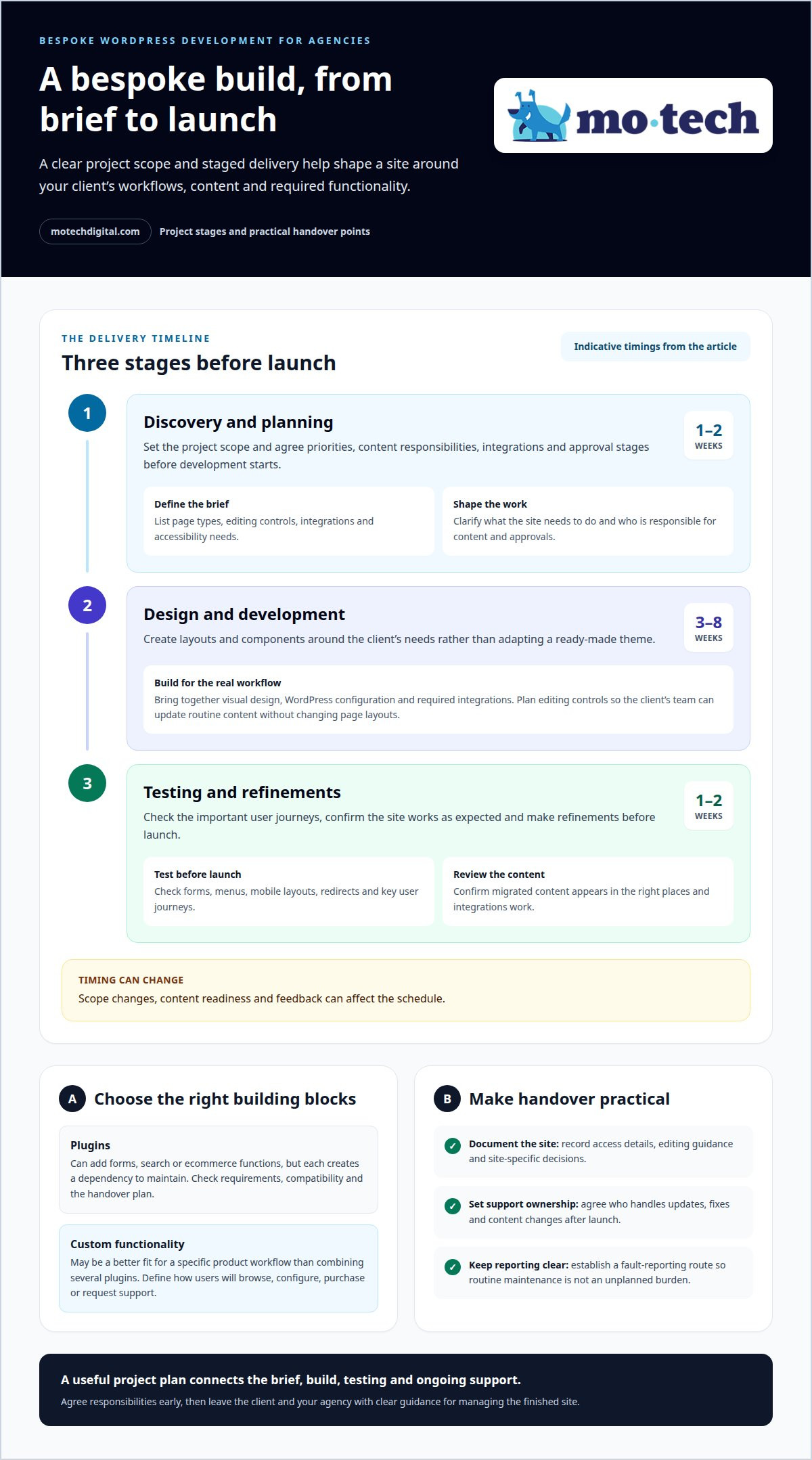
Rather than adapting a ready-made theme, developers create layouts and components around the client’s needs. A membership organisation might need gated resources; a manufacturer might need product filters and enquiry routes. Set out page types, editing controls, integrations and accessibility needs in the brief. These details give design and development a clear scope.
Agree priorities, content responsibilities, integrations and approval stages before development starts. Then plan discovery, design, development and testing as distinct steps. Discovery and planning could take 1 to 2 weeks. Design and development could take 3 to 8 weeks. Testing and refinements could take 1 to 2 weeks before launch. Scope changes, content readiness and feedback can affect the schedule.
Plugins can add forms, search or ecommerce functions, but each creates a dependency to maintain. Choose plugins based on requirements, compatibility and the handover plan. If a product needs a specific workflow, custom functionality may be a better fit than combining several plugins. Define how users will browse, configure, purchase or request support.
Launch and Ongoing Support
Before launch, test forms, menus, mobile layouts, redirects and key user journeys. A final content review and clear fault-reporting route make handover practical. After launch, support can cover updates, fixes and content changes. Agreeing who owns each task helps prevent routine maintenance from becoming an unplanned burden for your agency.
For ecommerce, WooCommerce can manage product listings, baskets and checkout within WordPress. Map the customer journey first, including product choices, delivery information and post-purchase content. This keeps the build focused on how your client sells and serves customers.
What a Bespoke WordPress Build Includes
A bespoke WordPress build combines tailored design, an editable content system and the functions a client needs. The value of bespoke WordPress builds for agencies is that these elements can fit the client’s work, rather than forcing its processes into a generic setup. A site might need to publish case studies, collect service enquiries or organise a large resource library.
Start by mapping the client’s goals, audiences and existing content. A charity may need donation information and campaign pages, while a consultancy may prioritise service pages and enquiry forms. Then define page types, navigation and content fields. This gives designers and developers a shared specification and helps your agency set clear approval points.
The build brings together visual design, WordPress configuration and required integrations. A staff directory, for example, may need consistent profile fields; a case-study library may need categories and filters. Editors should be able to update routine content without changing page layouts. Documenting editing controls makes handover clearer and helps the client’s team manage its content.
Test the tasks visitors need to complete: check navigation, forms, mobile layouts and content display across representative pages. Confirm that integrations work and migrated content appears in the right places. The final handover can include access details, editing guidance and site-specific decisions. For bespoke WordPress builds for agencies, these records give your team a practical reference for future updates.
For agencies defining delivery workflows, WordPress build support can help keep technical work aligned with client requirements. A clear scope, agreed responsibilities and documented handover give your team a useful basis for maintaining the finished site.
WordPress Maintenance, Security and Performance
As requirements change, bespoke sites can develop plugin conflicts, security gaps or slow pages. Reduce these risks with a documented plugin inventory, regular updates, backups and testing after changes.
WordPress maintenance should cover core software, themes, plugins and the site’s technical health. Review updates in a test environment before applying them to the live site. Afterwards, check key forms, navigation and integrations. This process helps catch problems before they disrupt client enquiries or content publishing.
Plugins require particular attention. They account for 97% of new WordPress security vulnerabilities, so remove unused extensions and keep necessary ones updated. Assign responsibility for monitoring updates and responding to issues. Daily backups support recovery if a change causes problems, while access controls help limit who can alter the site.
Focus performance work on the actual user experience. Review page loading, image sizes, scripts and Core Web Vitals. A growing directory, product catalogue or set of locations can also put pressure on site structure. Plan scalable content types and efficient search before those needs become difficult to manage.
Maintenance needs can change as a site ages. After 3 or 4 years, a website may use out-of-date technology or deprecated code. Schedule a technical review to identify dependencies, outdated components and areas needing redevelopment. Record findings, priorities and responsibilities so ongoing work follows a clear plan.
For agencies, maintenance needs depend on integrations, custom functionality, update frequency and traffic demands. A simple publishing site differs from a WooCommerce shop with connected services. Define the support scope and reporting process at handover, then review them when the client’s services or site requirements change.
Agency Experience, Reviews and Client Work
Assess an agency’s experience through relevant WordPress projects, not broad claims alone. Look for examples involving similar content, integrations or customer journeys. A membership-site example, for instance, should explain how members find resources and how staff manage them. This gives you a clearer view of the work behind the finished design.
Look for specific details in reviews about communication, delivery and problem-solving. A comment praising clear updates during a WooCommerce build tells you more than a general compliment. Compare the feedback with the project example. Together, they should give a consistent picture of how the agency works with clients and handles changes.
Design quality matters, but so does the reasoning behind each choice. Check whether typography, colour, layout and navigation suit the client’s identity and audience. A service business may need prominent enquiry routes, while an online shop needs easy-to-scan product categories. Custom WordPress should support those needs, not impose a theme’s limits.
Trace a user journey from entry to action. For a consultancy, follow a visitor from a service page to a relevant case study, then to an enquiry form. For ecommerce, test the path from product discovery towards checkout. Note where labels, page structure or steps create friction. These examples show whether the design supports real user tasks.
Ask how the agency tests its work before launch. A useful process includes reviewing mobile layouts, forms, navigation and key page templates, and explains how feedback is gathered and applied. Look for project examples that show the challenge, decisions and outcome, not just polished screenshots. This helps you judge whether the work meets your clients’ needs and your agency’s standards.
Discuss your next WordPress project through a conversation about your agency’s requirements.
White-label WordPress support for agencies
mo•tech provides White-label WordPress support for agencies that need technical delivery under their own brand. Your agency remains the client’s point of contact while technical work happens behind the scenes. This can keep projects moving when internal capacity is stretched or a site needs specialist WordPress attention.
Support can cover requests, fixes and content updates after a build goes live. Your team can pass on a client’s change request and coordinate the response within its existing relationship. Clear responsibilities help protect the client experience: your agency manages communication, while technical tasks are handled behind the scenes.
Use this model when new builds compete with maintenance work or a project needs skills your team cannot readily assign. Custom Builds support projects requiring tailored WordPress development. Managed Security and SEO & Performance address other technical needs. Match the support to the work involved, the site setup and the responsibilities your agency wants to retain.
Before work begins, define the request, access arrangements, deliverables and who will update the client. For a WooCommerce site, describe the issue, identify the affected customer journey and agree how your agency will communicate progress. A useful handover gives the technical team context without making your client repeat their requirements.
White-label support does not replace your agency’s client relationship. It extends delivery while keeping your brand and client communication central. This can help with individual technical tasks or ongoing WordPress support across your client base.
Contact mo•tech to discuss WordPress support for your agency.
Set a Clear Technical Path for Your Agency
Make technical delivery part of your agency’s operating plan. Decide which work stays with your team, where specialist input fits and how clients will experience the handover. That clarity helps you take on suitable projects while maintaining the relationships and standards your agency has built.
Bespoke WordPress builds for agencies work best when the technical plan supports how your team serves clients. mo•tech provides White-label WordPress support, Custom Builds and Managed Security for agencies. This gives your team a clear route for technical delivery while your agency remains central to its client relationships.
Choose support that matches the work ahead, whether you’re planning a new build or organising technical capacity for existing accounts. The right arrangement should fit your workflow and make responsibilities clear for everyone involved.
Contact mo•tech about your WordPress build and discuss a practical next step for your agency.
Frequently Asked Questions
Can you integrate WordPress with third-party services like Salesforce, Mailchimp or Google?
Yes, a WordPress project can connect with services such as Salesforce, Mailchimp or Google. The right method depends on the service and the information that needs to pass between systems. Define what should trigger the connection, what data it should exchange and how staff will use the result. For example, a contact form might send enquiry details to a CRM.
Do you build custom WordPress themes or use templates?
A custom theme can be built around your agency’s designs and technical specifications. Templates may suit projects where existing layouts meet the client’s needs, while a bespoke theme offers more control over page structure and editing options. Consider how the client will manage content and whether the design needs specific components. mo•tech provides custom theme and core website development for agency projects.
What acceptance criteria should an agency define for a bespoke WordPress build?
Set acceptance criteria around observable tasks, such as submitting an enquiry, finding a product or editing a page. Record which browsers, devices and user roles need testing. Agree who reviews each item and how defects are reported. These criteria give your team and the client a shared way to assess whether the finished site meets the agreed requirements.
How long does a custom WordPress agency build take?
A custom WordPress build moves through planning, design and development, then testing before launch. Discovery and planning could take 1 to 2 weeks; design and development could take 3 to 8 weeks; testing and refinements could take 1 to 2 weeks before launch. Content readiness, integrations and feedback can affect the schedule, so map approvals and client inputs into the project plan.
How do bespoke WordPress builds compare with themes and page builders?
Themes and page builders provide ready-made structures that can suit straightforward requirements. A bespoke build gives the development team more control over design, the editing experience and custom functionality. The trade-off is that tailored work needs a clear specification and an ongoing maintenance plan. Choose based on the client’s content and user journeys, rather than assuming one approach suits every project.
Which UK WordPress developers specialise in white-label agency builds?
mo•tech specialises in white-label WordPress development and support for agencies across the UK. Its team works behind the agency’s brand, providing custom builds, technical maintenance, fixes and content updates. This model can suit your agency when internal capacity is limited or a project needs WordPress expertise. Your agency remains the client’s point of contact and manages the relationship.