
The Figma file is only the starting point. The real test is turning it into a WordPress site your agency can confidently deliver under its own name.
A white-label Figma-to-WordPress development service should turn approved layouts into a working custom build, keep your agency in control of client communication and clarify revisions, responsive behaviour, testing, security, handover and post-launch support.
A faithful visual match is only part of the job. Your clients need a site that works across devices and meets their needs, while your team needs a dependable process that avoids unclear decisions and preventable rework. This guide covers what to prepare, how custom functionality affects delivery, what to expect from testing and security, and how a development partner can work behind your agency’s brand.
Key Takeaways
- Prepare approved Figma designs, page content and project requirements so development can start with a clear scope.
- Define how custom themes, plugins, integrations and functionality should serve the finished site before build work begins.
- Make responsive testing, performance checks and security part of the handover, not an afterthought.
- Agree how feedback, revisions and post-launch support will work to keep delivery clear for your agency and its clients.
White-label WordPress development for agencies
A white-label Figma-to-WordPress development service turns approved designs into WordPress builds while your agency retains the client relationship. Agree the scope and written terms in advance, including revision rounds, ongoing maintenance, response expectations and responsibility for post-launch issues.
Agency Outsourcing and Remote Teams
Outsourcing means assigning defined WordPress work to an external technical partner instead of bringing every skill in-house. Your agency owns the brief, client relationship and approvals; the partner handles the agreed development. Specify who receives the Figma files, resolves design gaps, tests staging changes and reports progress. Clear responsibilities reduce hand-offs when a project needs specialist development.
Agency and Business Benefits
Agencies can expand delivery capacity for a custom build without permanently changing their internal team. A small design studio, for example, may have strong client strategy and visual design but limited WordPress development capacity. A business without an agency team may also outsource development, but white-label arrangements suit agencies retaining client-facing responsibility. In both cases, clear ownership connects technical decisions to the client brief.
A freelance WordPress developer may suit a discrete task; a technical partner can take on connected work such as templates, integrations and testing. Choose an approach based on the task’s complexity, the need for continuity and how much coordination your agency can manage. Before work begins, agree the scope, deliverables, feedback route, access permissions and post-launch support in writing.
Timelines depend on scope. According to E2M, smaller WordPress websites usually take 2 to 3 weeks from kickoff to completion. E2M estimates complex WordPress builds usually take 4 to 8 weeks, depending on project specifics. Identify page types, integrations and custom functionality in the brief before agreeing dates. A defined workflow also makes dependencies and client review points easier to plan.
Custom themes, plugins, integrations and functionality
Figma layouts can become custom WordPress themes, Gutenberg blocks, plugins and connected digital services. Choose an approach that preserves the design while giving your client practical ways to manage site updates.
Custom Themes and Reusable Components
A custom theme translates the approved Figma design into page templates and reusable components. For example, a shared header, button style and card layout can keep service pages consistent without rebuilding each element. To match the design closely, the developer maps spacing, typography, colours and mobile layouts, then checks how components work with real content.
Reusable components also simplify later updates. If a client changes a call to action across several pages, a shared component can keep its presentation consistent. With white-label delivery, your agency remains the client-facing provider, and project files, handover notes and agreed branding follow your agency’s process.
Integrations, Functionality and Supported Tools
Integrations connect WordPress with services a project relies on, such as a form platform or CRM. Custom functionality fills gaps that standard plugins do not address. Before implementation, ask the developer to identify integration requirements from the Figma brief and document how information should move between systems. This clarifies scope and prevents a new feature from being mistaken for a simple visual adjustment.
WordPress supports its block editor, Gutenberg, alongside third-party page builders and custom themes. Which tools a provider supports depends on its technical workflow and the project’s existing setup. Name the required editor, plugins and integrations in the project brief. This lets the developer plan around the tools your client already uses, rather than introducing an unnecessary change.
For projects that need bespoke development, custom WordPress builds can provide a route from approved design to working site, with agency branding and client requirements kept in view.
Partner expertise, quality assurance and security
A capable development partner does more than reproduce a Figma screen. For a custom WordPress build, look for clear technical decisions, considered plugin choices and testing that catches issues before handover. Ask how the team handles incomplete designs, records assumptions and organises code for future updates. These details show how the process will hold up when project requirements change.
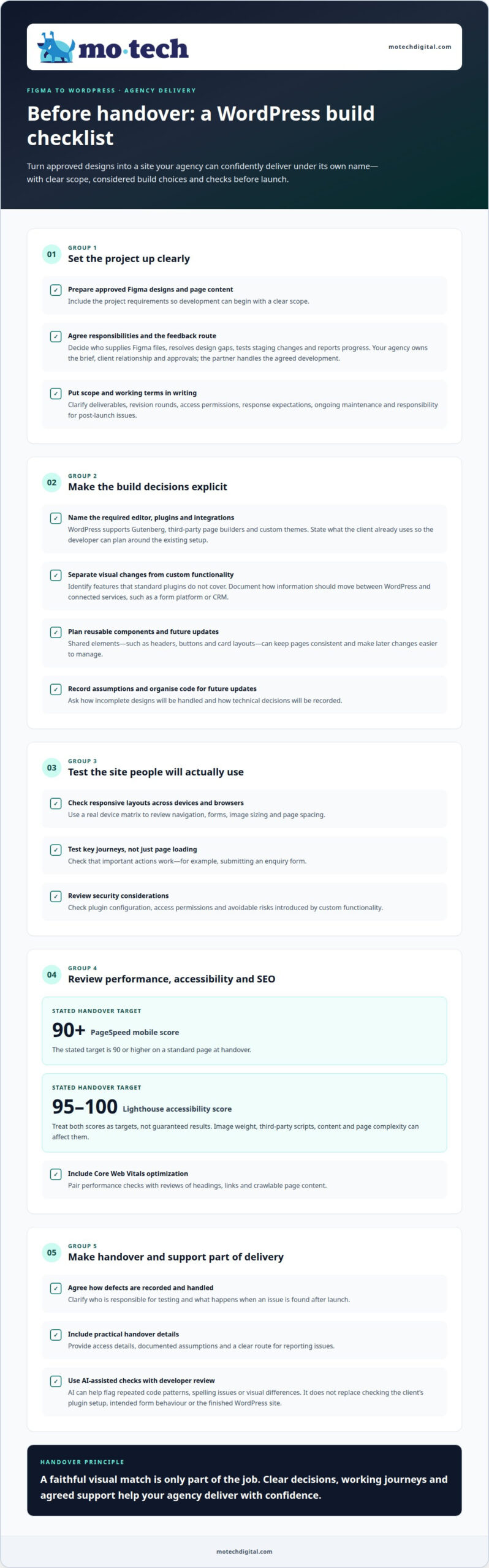
Responsive testing should cover the layouts your client will actually use. A real device matrix helps identify issues with navigation, forms, image sizing and page spacing across devices and browsers. The team should test key journeys, such as submitting an enquiry form, rather than only checking whether each page loads. Security checks should also consider plugin configuration, access permissions and avoidable risks introduced by custom functionality.
Performance, accessibility and SEO checks belong in the handover process. A stated target is a PageSpeed mobile score of 90 or higher on a standard page at handover. Another stated target is a Lighthouse accessibility score between 95 and 100. These are targets, not automatic results for every page. Image weight, third-party scripts, content and page complexity can affect scores. Core Web Vitals optimisation should sit alongside checks for headings, links and crawlable page content.
AI-assisted development can help flag repeated code patterns, spelling issues or visual differences between a design and its build, but it does not replace developer review. A generated suggestion, for example, may overlook the client’s plugin setup or a form’s intended behaviour. Use AI as an aid, then test the WordPress site and review changes before release.
Agree who handles testing, how defects are recorded and what happens after launch. A practical handover includes access details, documented assumptions and a clear route for reporting issues. For a site with several integrations, test each connection with realistic data. This helps your agency understand what has been checked, what remains in scope and how ongoing technical work will be managed.
White-label WordPress development and how it works
A clear process turns approved Figma screens into a working WordPress site while your agency retains the client relationship. Start with a defined brief, then agree how communication, feedback and decisions will move between your agency and the development team. Everyone should understand the work before the build begins.
The schedule depends on the design, content and technical scope. A straightforward brochure site has different requirements from a complex WooCommerce build involving product data, payment steps and connected systems. Record dependencies such as access credentials, approved copy and integration details. Development or testing may have to wait until those inputs are ready.
- Prepare the handover. Provide Figma files, page content, brand assets and notes on interactions. Mark incomplete screens and identify mobile layouts.
- Confirm the scope. Match each design to a WordPress template, list custom functionality and agree which integrations are required.
- Build in stages. The developer creates the agreed structure and shares staging work for review. Your agency gathers feedback through one route.
- Review and refine. Check the pages against the design, test forms and integrations, then resolve agreed amendments before launch.
- Hand over clearly. Confirm access, document relevant setup decisions and agree how ongoing issues or updates will be handled.
Assign clear owners for communication. Your agency can manage client approvals while the developer reports technical progress and flags blockers. For example, if a Figma interaction has no mobile state, record the assumption and resolve it before the decision affects several templates. This keeps work moving while ensuring your client is not left with hidden uncertainties.
Before launch, agree who approves the staging site, who applies final content changes and who coordinates the release. A white-label partnership works best when the client sees one accountable agency contact, while technical work follows the agreed process behind the scenes. If you need a development partner for this workflow, discuss your WordPress project.
Mo•tech: White Label WordPress Support
mo•tech provides White Label WordPress Support for agencies that need WordPress work delivered behind their own client relationships. Use it when a project needs additional development capacity or ongoing technical work would otherwise draw your team away from client priorities. Custom Builds cover tailored WordPress development, while Managed Security and SEO & Performance address related technical needs.
Your agency remains at the centre of the client relationship: your team leads the brief and client communication, while mo•tech handles the agreed WordPress work in the background. This suits agencies delivering a new Figma-led build as well as those needing technical support after launch.
Discuss your project with mo•tech to find the right support for your agency’s workload.
Set up your next build with a clear working relationship
Start by identifying where extra technical capacity would make the greatest difference: a new Figma-led build, a flow of WordPress work your team cannot absorb, or security work that needs focused attention. A white-label Figma-to-WordPress development service should fit your agency’s workflow and protect the client relationship you have built.
mo•tech provides WordPress expertise for work delivered under your agency’s brand. White Label WordPress Support, Custom Builds and Managed Security can each address a different part of your workload, depending on the project. Your agency remains the client-facing provider, and the technical work follows the agreed scope.
Start with the project brief, the design files and the responsibilities you want to keep in-house. That gives both teams a practical basis for discussing delivery and the right working arrangement. Contact mo•tech to discuss your project, and take the next step at a pace that suits your agency.
Frequently Asked Questions
How to get started?
Choose a suitable project and identify who will make technical decisions for your agency. Gather the approved design files and note any parts of the brief still awaiting client input. Clear ownership prevents conflicting instructions and gives the development team a reliable point of contact as work progresses.
How quickly can you deliver a WordPress website?
Delivery time depends on the scope, content readiness and technical dependencies. A site with final copy and settled design decisions can progress more directly than one waiting on product details, integrations or client approvals. Set a launch target that accounts for those dependencies, with time for review and agreed changes before the site goes live.
What Does the Development Process Look Like?
Begin by agreeing the project scope and how decisions will be made. Development turns the approved design into a working WordPress site, followed by review and resolution of agreed changes. Your agency coordinates client feedback while the developer handles technical questions. Before launch, agree who approves the final site and who takes care of follow-up work.
What is a white-label Figma to WordPress development service?
A white-label Figma-to-WordPress development service turns design files into a WordPress website your agency can deliver under its own brand. Your agency retains the client relationship while a development partner completes the agreed technical work in the background. This approach helps agencies take on WordPress projects without assigning every build task to their in-house team.
Which agencies offer white-label Figma to WordPress services in the UK?
mo•tech provides white-label WordPress development and support for digital agencies across the UK, including custom website development based on agency designs and technical requirements. This can suit an agency that needs extra capacity for a project or ongoing technical assistance while its team focuses on client strategy and creative work.
What happens if a design changes during development?
Record, assess and agree changes before adding them to the build. A new page layout, for example, may affect existing templates, mobile behaviour or connected features. Your agency can clarify whether a change replaces an earlier requirement or adds to the scope. This keeps the work clear and helps the team plan its next review.