
White-label WordPress development support lets your agency keep the client relationship and project ownership while a development partner works behind the scenes. The partner follows your project management, Git, staging, communication and QA processes. Your clients see your agency, while your team gains extra capacity.
That separation matters when you need dependable help with plugin issues or a busy delivery schedule without adding another layer of client management. The right arrangement fits your workflow instead of requiring you to rebuild it around an external team.
This guide explains how to choose support for workload spikes, specialist technical needs and white-label delivery. You’ll learn what to include in a handoff, how to assess a partner with a defined task, and when extra development capacity may suit you better than a permanent hire. It also explains how to look beyond the hourly rate and assess the work and management burden the support takes off your team.
Key Takeaways
- Keep client communication and project ownership with your agency while setting clear boundaries for development work.
- Trace plugin conflicts through recent changes, dependencies and testing before applying a fix to a live site.
- Match support to the work: use external capacity for temporary demand, and consider a permanent role when demand is predictable.
- Assess a partner through a defined task, including how they handle code quality, QA and delivery within your existing workflow.
Can support stay white-label?
Yes. Your agency can retain the client relationship and overall project ownership while a development partner handles defined technical work. UK agencies can use specialist WordPress development partners to support delivery behind the scenes. Before work begins, agree who communicates with the client, approves changes and reports progress.
Set those boundaries in the project brief. For example, your account manager remains the client’s contact, while the developer posts progress in your agency’s project management system. The developer follows your Git process, works on staging, and uses your communication and QA channels. Your team can track delivery without adding another client contact.
WordPress overflow development support can also help clear a maintenance backlog. Group tasks by risk and effort: a broken checkout needs a different priority from a minor layout adjustment. Assign an owner, acceptance criteria and deadline to each task, then check completed work against those criteria before presenting it to the client. Clear scope and handoffs make the added capacity easier to manage and help protect project margins.
Outsourcing can introduce security, GDPR and confidentiality risks when developers access client data, credentials or private code. Limit access to what each task requires, use staging instead of live credentials where practical, and remove access when the work ends. Agree how personal data, code and project information will be handled. A shared access register and clear confidentiality terms help your team track who can see what.
- Communication: Keep client-facing updates with your agency.
- Workflow: Share the relevant Git, staging and QA procedures.
- Handoff: Provide requirements, designs, dependencies and acceptance criteria.
- Review: Check code quality, testing and completion before client delivery.
A defined workstream makes the arrangement easier to assess. Start with a contained plugin change or backlog task, then review communication, technical judgement and QA. Your agency remains accountable for the client relationship, while the development team works within the delivery structure you set.
Plugin conflicts and update troubleshooting
When a WordPress update breaks a page, identify what changed before editing code. Record the affected plugin, theme and WordPress versions, along with the error, page and time it appeared. Reproduce the issue on staging rather than the live site. This gives developers a clear starting point and protects the working version during investigation.
Test one change at a time. Check whether the issue began after a plugin, theme or WordPress core update. Review error logs and browser console messages, then isolate likely conflicts on staging. For example, a booking form might fail because its plugin conflicts with a recently updated theme. Testing components separately helps narrow down the cause before you change settings or code.
- Reproduce the fault and record the steps.
- Review recent updates and relevant error messages.
- Test suspected conflicts on staging.
- Apply the fix, then retest affected pages and key actions.
Theme changes can leave cached files displaying an older layout. After an update, clear the relevant site, browser or CDN cache, then reload the affected page. If a CSS change still appears to be missing, inspect the loaded stylesheet before repeating the edit. This helps distinguish a display delay from a code problem.
Check customisations separately. A theme update can overwrite edits made directly to theme files. Keep custom code in a suitable child theme or documented custom component, then test the updated theme against those changes. For sites using the WordPress block editor, check that the editor and front-end output still match after updates.
One reported mobile issue persisted despite CSS rules setting overflow-x to hidden and clip at viewport widths up to 767 pixels. That points to checking the element causing the width, not simply hiding overflow. Inspect containers, images and embedded content on the affected phone width. Test multilingual pages using Polylang or WPML too, where language-specific layouts may expose the same fault.
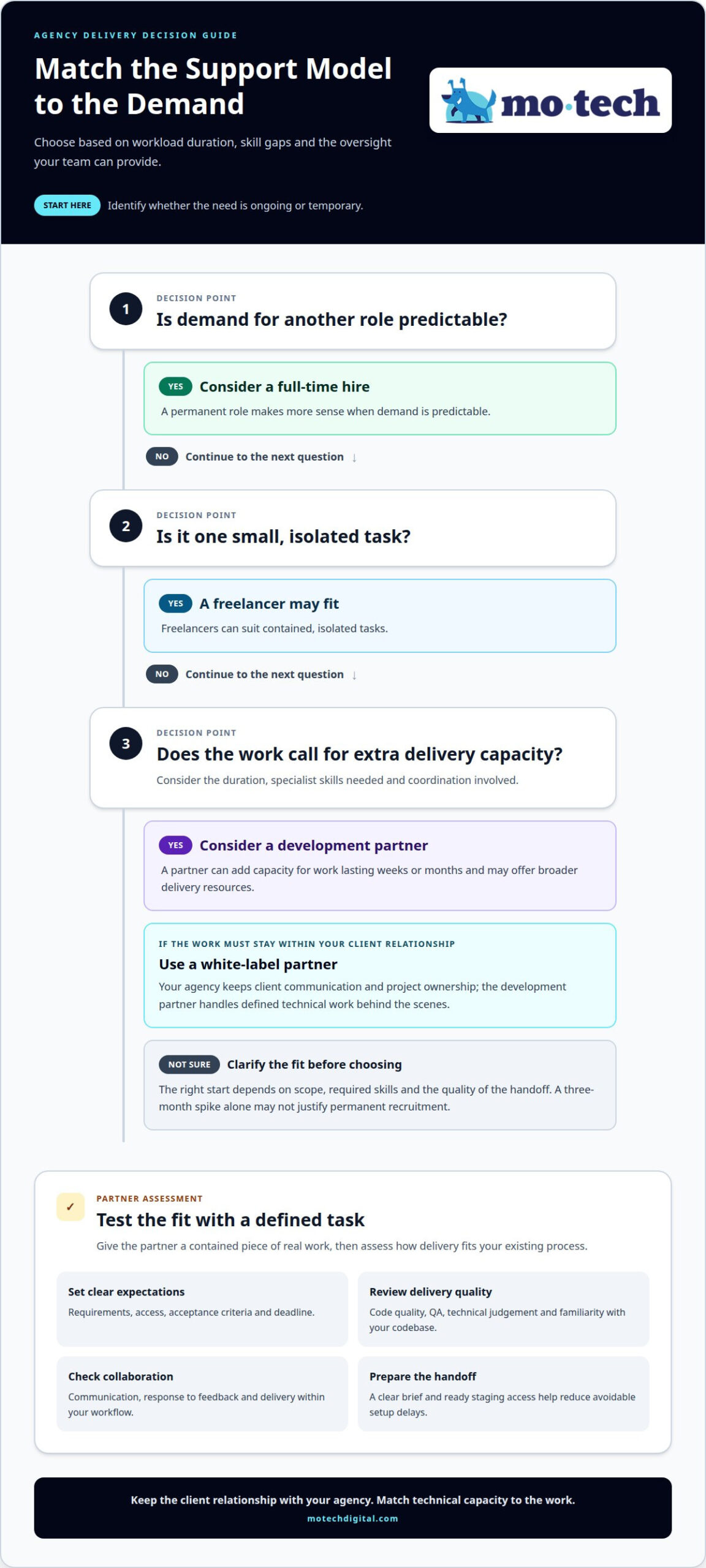
Choosing support based on workload and technical skill needs
Choose a delivery model by weighing workload duration, skill gaps and oversight.
Additional Development Capacity
A freelancer may suit one small, isolated task. A development partner can add capacity for work lasting weeks or months, while a full-time hire makes more sense when demand for another role is predictable. A three-month spike alone may not justify permanent recruitment. WordPress overflow development support suits agencies with defined technical gaps and temporary workload pressure.
Compare options by scope and coordination needs. Freelancers often handle contained tasks, while agencies may offer broader delivery resources. A white-label partner suits work that needs to remain within your client relationship. For example, your team may need specialist help with a custom plugin while handling strategy and client updates internally. WordPress overflow development support can fill that short-term capacity gap.
Extra capacity can begin once the task, access and delivery expectations are agreed. The start depends on the scope, required skills and quality of the handoff. A clear brief and ready staging access help reduce avoidable setup delays. Provide the technical context before work begins.
Quality and Reliability Assessment
Start with a defined project or technical task. Provide the requirements, access, acceptance criteria and deadline. Assess code quality, communication, technical judgement, QA and familiarity with your existing codebase. Check whether the work meets the agreed date. A contained task shows how the team handles real constraints and responds to feedback.
Clarify who tests each change. If your agency must QA every detail, the partner may shift work rather than reduce it. Review how defects are reported, fixed and retested. A reliable process records decisions and completed checks, so your team can understand the change without retracing every step.
Compare the total delivery cost, not just the hourly rate. Include briefing, oversight, revisions and QA time, then consider how much management effort and delivery risk the partner removes. If the added capacity still leaves a project unprofitable, reconsider its scope or delivery plan. The right arrangement should support your agency’s margins as well as its technical workload.
White-label support
White-label delivery keeps your agency visible and the developer behind the work. Your agency retains the client relationship and overall project ownership, while the development team completes agreed tasks within your delivery process. For example, your account manager presents progress as the developer records technical updates in your project system.
That separation needs clear practical boundaries. Agree who can contact the client, who approves scope changes and how questions reach the developer. If a client reports a checkout fault, your team can log the issue, share the relevant details and provide the agreed update. The development partner works on the task without taking over the client conversation.
Set the working pattern before the first handoff:
- Communication: Use your project channel and agreed reporting format.
- Access: Share only the accounts and code needed for the task.
- Delivery: Record requirements, dependencies and acceptance criteria.
- Approval: Keep scope decisions and client sign-off with your agency.
Existing workflows matter. A partner should fit your project management, Git, staging, communication and QA processes. If your team uses Git branches and staging reviews, the developer should follow that sequence. This avoids duplicate tracking and makes it easier to see what changed before release.
Define what “done” means for each task. A custom template, for example, may need to match supplied designs, work across agreed page types and pass your stated checks. Include those criteria in the handoff. The developer can then return the work for review, and your agency can update the client based on completed checks.
White-label delivery works best when responsibility remains visible within your agency, even if clients never see the development work. Your agency owns the relationship, while the partner owns its assigned tasks. That boundary helps maintain a consistent client experience during busy delivery periods.
Discuss a white-label delivery setup for your agency’s WordPress workload.
Mo•tech: White Label WordPress Support
mo•tech provides White Label WordPress Support for agencies that need dependable development capacity while retaining client ownership. It can help when project demand exceeds your team’s available time or WordPress work requires skills your agency lacks in-house. Your agency keeps the client relationship, and the development work fits behind your delivery process.
For broader requirements, mo•tech also provides Custom Builds, Managed Security, and SEO & Performance. These services support agencies with site builds, security management and technical optimisation as part of client delivery. Start by defining the task, its intended outcome and how it fits your agency’s workflow.
If your team needs a behind-the-scenes WordPress development partner, contact mo•tech to discuss your agency’s requirements.
Make your next delivery decision with clarity
Start by identifying where additional development capacity would make the greatest difference. Choose a current workload or technical gap, then define the outcome your agency needs. That gives a discussion about WordPress overflow development support a practical starting point, grounded in delivery rather than assumptions.
mo•tech provides White Label WordPress Support for agency delivery, alongside Custom Builds and Managed Security. These services support teams that need behind-the-scenes development, a tailored WordPress build or security management as part of their client work. Your agency decides what fits its projects and workflow.
Bring a specific requirement to the conversation, such as a backlog item, planned build or capacity constraint. Contact mo•tech about WordPress support to discuss a suitable next step. A clear brief can help you decide how extra technical support fits your agency’s plans. Your team can move forward with a delivery approach that feels manageable.
Frequently Asked Questions
What access is normally needed?
Access depends on the task, but usually covers the relevant WordPress environment and project files. A developer fixing a layout issue may need a staging login and repository access, while a hosting configuration change may require additional permissions. Use separate accounts where possible, grant only the access needed, and remove it when the work ends. Keep production credentials restricted unless the task requires them.
What does WordPress development overflow support include?
It can cover technical work your agency cannot fit into its current schedule, from resolving a broken form to building a bespoke WordPress theme. Ongoing support may also include maintenance, bug fixes and content updates. For example, your agency could assign approved website fixes while its own team focuses on client planning. The work depends on the project scope and technical requirements.
What skills and services should a WordPress overflow developer provide?
Look for practical WordPress development skills suited to the task, such as diagnosing PHP errors, adjusting theme templates, resolving plugin issues and making front-end changes. Broader agency needs may call for custom builds, managed security, or technical SEO and performance work. A developer should also explain technical decisions clearly, document changes and leave code understandable for the team maintaining it.
What onboarding steps are needed to hand WordPress work to an overflow team?
Begin by identifying the site’s purpose, key user journeys and any restrictions on changes. Share a short site map, relevant design files and examples of expected behaviour. Explain how your agency names branches, records issues and approves releases. Include a decision-making contact and a process for reporting unexpected problems. This context helps the team avoid solving one issue in a way that disrupts another.
Which UK agencies offer WordPress development overflow support?
mo•tech offers white-label WordPress development support for agencies.
How quickly can a WordPress overflow partner provide extra development capacity?
Timing depends on the scope, required skills and quality of the handoff. A clear brief and ready staging access can reduce setup delays. Work can begin once the task, access and delivery expectations are agreed.