
The best agency theme isn’t necessarily the one with the most striking homepage. It’s the one your team can adapt to its services and maintain after launch. WordPress theme development for agencies should account for how you build sites, how clients edit them, and what happens when a project is handed over.
A polished design matters, but so does a reliable setup. If routine changes are difficult or clients aren’t sure what to do, the handover can create avoidable support work.
This guide explains how to assess themes against your services and workflows, then plan client training, handovers and licence management. Use it to decide whether to adapt an existing theme or commission a custom build, keeping your team’s and clients’ day-to-day needs in view.
Key Takeaways
- Choose a theme for the way your agency works, including its page-builder compatibility and the editing experience you want clients to have.
- Match the theme to your services and workflows so it supports the sites you build and the steps your team follows.
- Consider a custom theme when a tailored design or functionality would better serve your agency and its clients.
- Plan how development connects with hosting and ongoing support, including clear client training, handoffs and licence management.
What Makes a Great Development Company WordPress Theme?
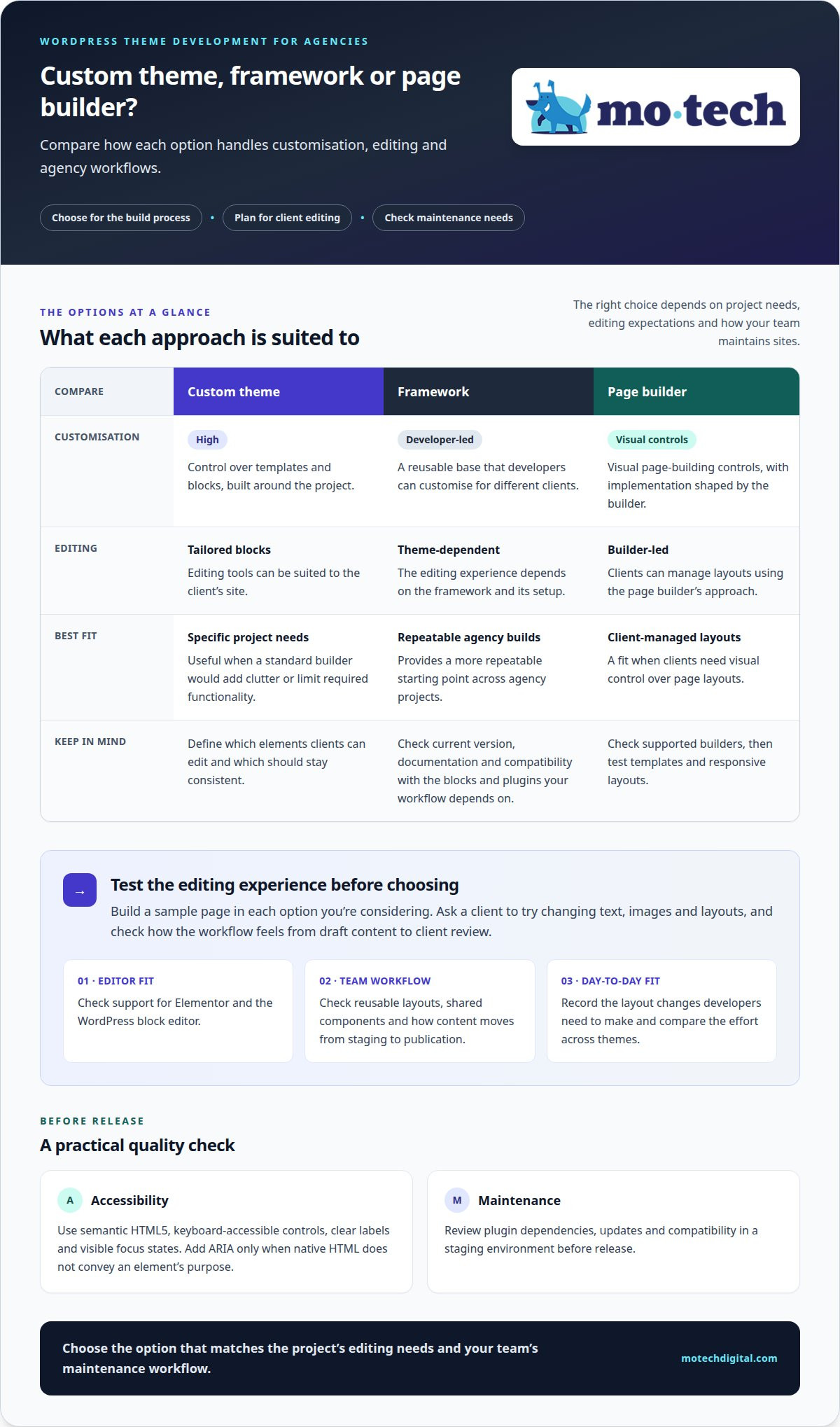
Choose a theme that fits your agency’s build process, not just its portfolio. Check support for Elementor and the block editor, customisation options, accessibility and maintenance before committing.
Custom Theme Development
A custom theme is built around a project’s design, content and required features. It gives your team control over templates and blocks instead of requiring you to adapt a general-purpose layout. Clients get editing tools suited to their site, while developers can keep the build focused. Choose this route when a standard builder would add clutter or limit required functionality.
WordPress Theme Frameworks
A framework provides a reusable base for agency projects that developers can customise for different clients. Compared with a bespoke theme, it offers a more repeatable starting point; compared with a page builder, it leaves more implementation decisions to developers. Check its current version and documentation, and test compatibility with the blocks and plugins your workflow depends on.
Elementor and the WordPress block editor support different editing approaches. Before choosing a tool, build a sample page in each one you’re considering and test how a client can change text, images and layouts. Check which builders a page-builder theme supports, then test Elementor templates and responsive layouts rather than assuming they’ll work.
For accessibility, use semantic HTML5, keyboard-accessible controls, clear labels and visible focus states. Add ARIA only when native HTML does not convey an element’s purpose. These practices support accessible use without treating a plugin or builder as a substitute for testing.
Build duration depends on the scope, design approvals, custom functionality and testing, so there’s no reliable fixed timeline. Plan for security and maintenance by reviewing plugin dependencies, updates and compatibility in a staging environment before release.
| Option | Customisation | Editing | Best fit |
|---|---|---|---|
| Custom theme | High | Tailored blocks | Specific project needs |
| Framework | Developer-led | Theme-dependent | Repeatable agency builds |
| Page builder | Visual controls | Builder-led | Client-managed layouts |
Choose the option that matches the project’s editing needs and your team’s maintenance workflow.
Choosing a theme to match services and workflows
Start with the work your agency sells, then assess how the theme supports delivery. A strong portfolio matters, but the site must also serve its purpose.
Service-Matched Theme Choices
A service-matched theme prioritises the work your agency needs to present. For a branding studio, flexible case-study layouts can clarify project outcomes; for a marketing agency, service pages may need room for campaign details and client testimonials. Rather than choosing by appearance alone, check that the page structure helps visitors understand each service and find a relevant next step.
Workflow-Matched Theme Choices
A workflow-matched theme fits the tools and handovers your team already uses. If account managers prepare page content and clients edit it later, test those steps in the theme’s editor before rollout. Check whether its page builder supports reusable layouts, whether developers can maintain shared components, and how content moves from staging to publication. Prefer a setup that reduces repeated manual adjustments.
Agency-Type Theme Choices
Your agency type helps determine the balance between visual freedom and repeatable structure. A design agency may prefer broader layout control to present distinctive creative projects; a technical agency may prioritise consistent service pages and clear navigation. A specialist studio can use a focused portfolio, while a full-service agency may need separate sections for each discipline. The theme should communicate those differences without confusing visitors.
Compare each option using the same practical criteria: service-page fit, portfolio layout, page-builder compatibility, client editing and maintenance. Test the full workflow on a sample project, from draft content to client review. Record the layout changes developers need to make, then compare the effort across themes. This keeps the decision grounded in daily use, not just a demo.
If a project needs a tailored build, explore custom WordPress development as another route.
What are the benefits of custom WordPress themes for agencies and their clients?
A custom theme lets your agency shape templates around a client’s content and goals. For a consultancy, that might mean structured service pages, staff profiles and case studies instead of unrelated demo layouts. Your team decides which elements clients can edit and which remain consistent across the site.
That control can make repeat work easier to manage. Developers can build shared components for recurring needs, such as testimonial panels or project summaries, and apply them consistently across relevant pages. Each client still gets a design suited to their identity. The result is a defined starting point for future updates, rather than a collection of one-off layout decisions.
Clients benefit when editing tools reflect how they manage their website. A team that regularly publishes news, for example, can use a focused post template with fields for a title, image and article text. This helps clients make routine changes within a familiar structure, while leaving more involved design changes to the agency.
- Clearer content structure: Service and case-study templates guide visitors through relevant information.
- Purpose-built functionality: Features can match a client’s process, such as a tailored enquiry form.
- Consistent project delivery: Reusable components give your developers a shared pattern for common page elements.
- Client-friendly editing: Defined content areas help clients update material without changing the whole layout.
Custom development also lets your team document the theme’s components and editing rules for handover. That record gives the client a practical reference after launch and helps another developer understand the build later. It doesn’t eliminate maintenance, but it makes the site’s structure more deliberate and easier to explain.
How WordPress theme development fits with agency support
A theme is only one part of a live WordPress site. Development also means testing it with the site’s plugins, content and hosting environment. For example, check a custom contact form alongside its page template and the process for sending enquiries. This joined-up testing helps keep the delivered site usable beyond the design review.
Hosting affects how a site is deployed and maintained, so plan it alongside theme development. Clarify who manages the hosting account, applies changes and handles access. Before launch, test the finished site in its intended environment, including key pages, forms and mobile layouts. Record theme dependencies and deployment steps for future maintenance.
Ongoing support covers the work that follows delivery. WordPress core, themes and plugins change over time, so test updates for compatibility before they reach a live site. A staging site gives your team a place to review changes. Daily backups can support recovery planning, and clear maintenance records help identify what changed if an issue arises.
Keep agency responsibilities clear for both your team and your client. Agree who handles content updates, technical fixes and hosting questions, and explain how requests reach the right person. If your developers need help with build work or ongoing technical assistance, white-label WordPress support can work behind your agency’s client relationship. Your agency remains the client’s point of contact, while technical delivery stays in the background.
For support with development work and ongoing maintenance, contact mo•tech about white-label WordPress support.
Mo•tech: White-label WordPress support
mo•tech supports agencies with WordPress delivery behind their own client relationships. With White-label WordPress support, services are delivered in the background under your agency’s brand. It can help when your team needs development or maintenance capacity without changing who clients contact about project updates and decisions.
Clear requirements connect a theme project to the client’s needs. Your agency can define the intended page layouts, editing experience and custom functionality, then keep the client informed about the work. mo•tech’s Custom Builds service supports projects that need a tailored WordPress build, alongside ongoing technical support.
Different sites need different technical attention after launch. Managed Security supports work focused on protecting WordPress sites. SEO & Performance covers technical SEO and performance optimisation. These services can complement theme work when a project also needs attention to security, search foundations or performance.
A practical working arrangement starts with a shared understanding of the project. Set out the scope, existing WordPress setup, expected deliverables and client communication process. Your agency leads the client relationship, while technical work can be handled in the background. This gives your team a defined way to extend delivery capacity while keeping project ownership clear.
Choose support that fits the work in front of you. If your agency needs help with WordPress development, security or performance, contact mo•tech to discuss your requirements.
Set your next theme project up for a clear handover
Before development starts, turn the theme decision into a concise delivery brief. Record the chosen editing approach, who will manage updates and what clients need to know after launch. Include licence details and the location of key handover documents so responsibility stays clear when the project moves from build to ongoing care.
This gives your developers and account team a shared reference. It also helps clients understand which changes they can make themselves and when to contact your agency. A clear handover supports the reputation you’ve built and keeps clients from having to work out the site alone.
For WordPress theme development for agencies, the build is only part of a dependable client experience. Handover and support arrangements matter just as much. mo•tech provides WordPress support behind the scenes, helping your team deliver and maintain client projects.
If you’re planning a theme build or need technical support around an existing project, discuss your requirements with mo•tech. A clear next step can make the work easier to plan for both your team and your client.
Frequently Asked Questions
What Makes a Good WordPress Theme for Agency Websites?
A good agency theme keeps content usable if the visual design changes later. Separate core content, such as service descriptions and articles, from presentation choices tied to a particular theme. This makes a future redesign easier to plan without rebuilding every page from scratch. When choosing a theme, check whether essential content depends on bundled plugins, as that can complicate future changes.
What does WordPress theme development for agencies include?
Theme development also means planning how the code fits the agency’s project and existing WordPress setup. Developers can, for example, keep a client-specific booking integration separate from the presentation layer, making it easier to maintain if the design changes. The work can also include agreed code conventions, version control and peer review, giving the agency a clearer view of changes before they reach the live site.
How can agencies make WordPress themes responsive, fast and SEO-friendly?
Use responsive image markup so WordPress can serve suitable image sizes, and load fonts in a way that limits visible text shifts. Avoid loading page-specific scripts across the entire site. For clear search signals, use descriptive URLs and avoid publishing near-identical pages about the same subject. Review actual pages after launch, since real content can behave differently from placeholder text.
How should agencies scope and hand over WordPress theme projects to clients?
Define the scope through agreed deliverables and acceptance criteria, such as which page types must pass review and which integrations are included. At handover, provide the client with ownership or access to the relevant code repository and hosting account, where applicable. Record the release version, deployment steps and rollback process. These details help the next maintainer trace changes and respond if a release causes an issue.